

You’ve finished a blog post, but the empty image slot is still waiting. A stock photo feels too generic, while commissioning an illustration for every article may stretch the budget. OpenArt is an AI image-generation and editing tool you might consider for that gap.
For a business blog, the useful question is how much it will cost to create images you’re happy to publish. The monthly fee is only part of that decision: you also need to account for usage rights, rejected attempts and editing time.
OpenArt’s paid plans start at $14 per seat per month. For commercial blog images, Plus at $34 monthly is the starting point under its current terms. Below, we’ll compare the plans, explain credits and work through the budget for eight blog posts.
Prices and terms checked Sep 28, 2026. Example budgets below use illustrative inputs rather than measured image-generation results.
OpenArt plans at a glance
|
Individual plan |
Monthly billing |
Annual billing display |
Monthly credits |
|---|---|---|---|
|
Starter |
$14 per seat |
$13 per seat per month |
4,000 |
|
Plus |
$34 per seat |
$27 per seat per month |
12,000 |
|
Pro |
$56 per seat |
$44 per seat per month |
24,000 |
|
Wonder |
$240 per seat |
$175 per seat per month |
106,000 |
The annual column shows the monthly equivalent on OpenArt’s pricing page when annual billing is selected. It is not a month-to-month offer, so check the full annual charge before paying; the displayed equivalents may be rounded. All prices are in US dollars, before applicable taxes.
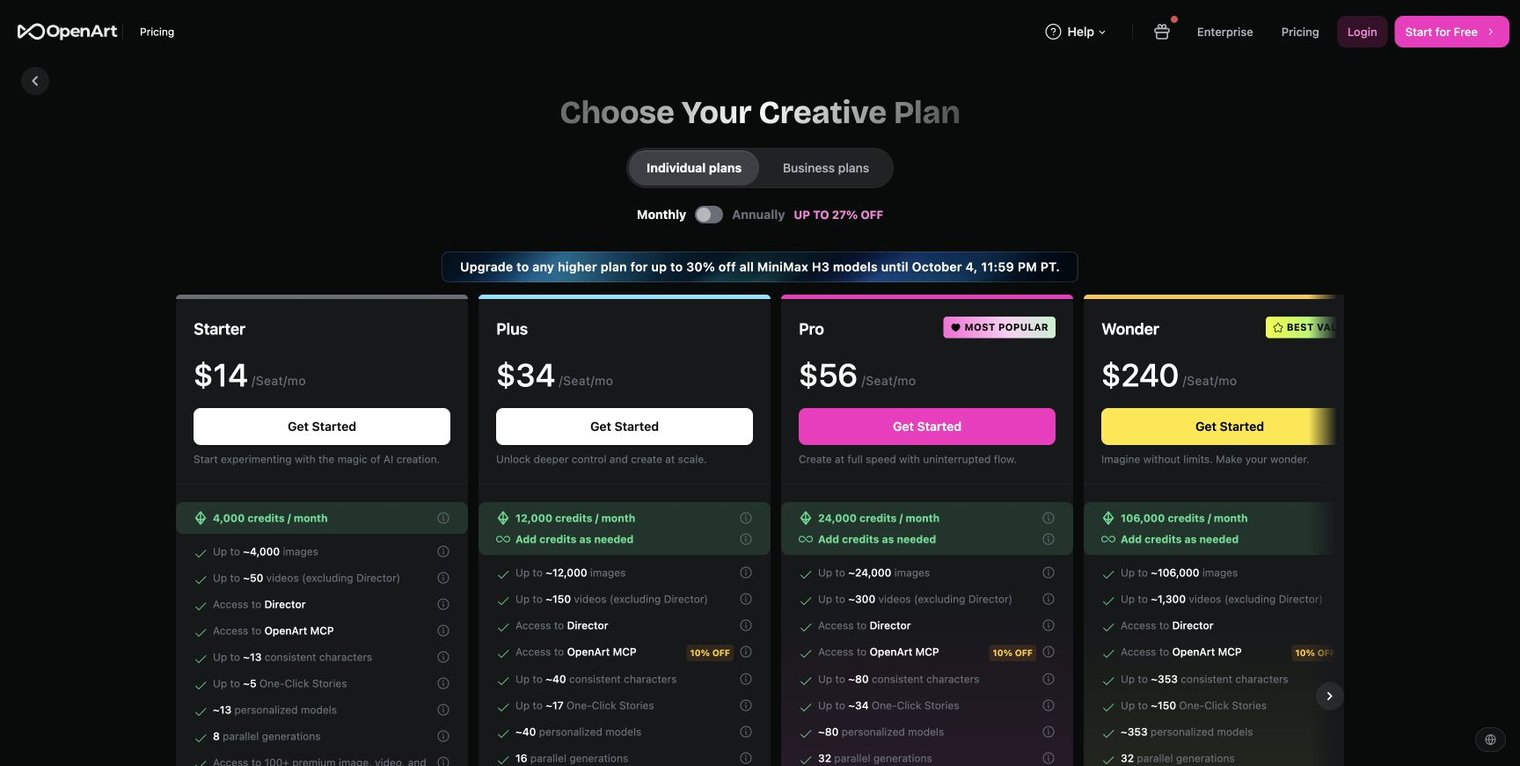
OpenArt’s pricing page with monthly billing selected. The table also shows the monthly equivalents for annual billing.
Start with the number of articles and images you expect to publish in a normal month. A generous credit allowance can be useful for a busy team, but it adds little value if most of it expires unused.
Which OpenArt plan do you need for a business blog?
For a company blog, a client project or a monetized publication, usage rights matter as much as the price. OpenArt’s current terms allow noncommercial use at every subscription level and commercial use on Plus and above. That makes Plus the baseline for the business-blog examples in this guide.
A plan’s permission does not establish that every output is suitable for publication. Review anything that resembles a real product, logo, person or factual event. For a tutorial showing what an application actually does, use an authentic screenshot. For an illustration explaining an abstract idea, an AI image may be useful if it helps the reader understand the subject.
This distinction can save money before you generate anything. A screenshot, a small comparison table or an original diagram might answer the reader’s question better than several rounds of generated artwork.
How OpenArt credits work
Credits pay for the actions you take inside OpenArt. The charge varies by model and tool, and the Help Center says the interface shows the required credits before generation. Check the model, settings and number of outputs before starting a batch.
Do not turn an “up to” image allowance into a promise of publication-ready images. Your workflow may include discarded drafts, another attempt at the composition, edits and an upscale. Those steps can consume credits without increasing the number of images you eventually publish.
Use two separate measures:
- Credit demand: all chargeable attempts and finishing actions needed to create your usable images.
- Cash cost per usable image: the subscription and add-on spend allocated to the project, divided by the images you actually publish.
The first tells you whether a plan has enough capacity. The second tells you whether it is good value for your blog. Neither measures quality on its own.
A worked budget for eight blog posts
Suppose you publish eight articles in a month and want four original illustrations for each: 32 finished images. For planning only, assume each finished image needs four generation attempts at four credits each, followed by a four-credit finishing step. These are illustrative inputs, not quoted OpenArt model prices.
Your estimated demand would be:
32 images × ((4 attempts × 4 credits) + 4 finishing credits) = 640 credits.
That uses about 5.3% of Plus’s 12,000-credit monthly allowance. Under these assumptions, capacity is not the reason to buy a higher tier. The commercial-use entitlement is the reason for choosing Plus over Starter.
If you pay $34 for a month of Plus and allocate the whole subscription to those 32 images, the subscription cost is $34 ÷ 32 = $1.06 per published image, before tax and your editing time. A theoretical fraction-of-a-cent credit value would conceal the unused subscription capacity.
|
Images actually published in the month |
Allocated monthly subscription |
Subscription cost per usable image |
|---|---|---|
|
8 |
$34 |
$4.25 |
|
32 |
$34 |
$1.06 |
|
96 |
$34 |
$0.35 |
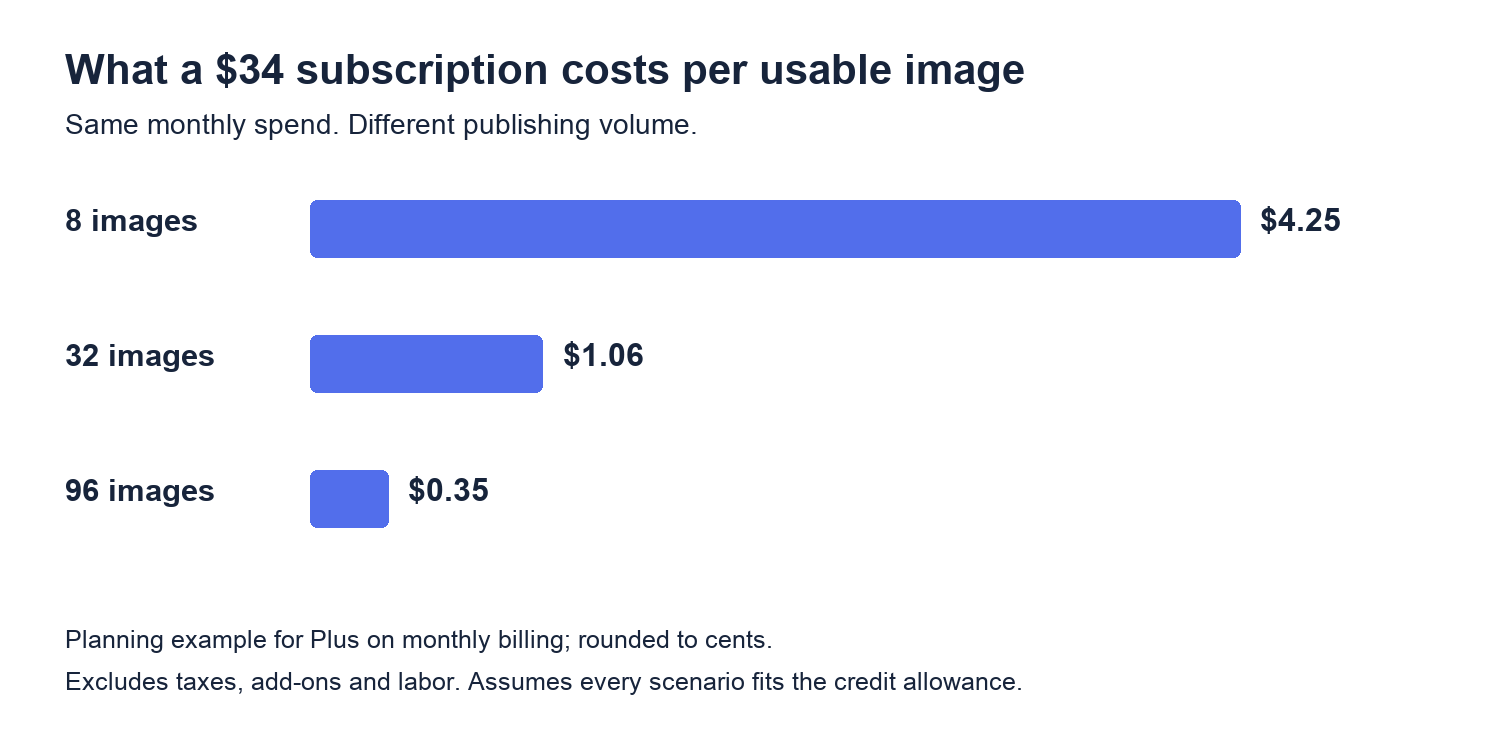
Original calculations assume the whole $34 monthly subscription is used for blog images and that all scenarios fit within the credit allowance. They exclude taxes, add-ons and labor.
If you also create visuals to promote your blog on Pinterest or use OpenArt for video, split the subscription cost between those activities. Allocating half of a $34 bill to 32 blog images puts their subscription cost at $0.53 each. Your total bill stays the same; the split helps you see what each part of your content plan costs.
Add the time spent choosing and fixing images
Your staff time can cost more than the subscription. If preparing, reviewing and finishing one image takes ten minutes, 32 images require about 5.3 hours. At an illustrative internal rate of $30 per hour, that is $160 in labor. Adding the $34 subscription brings the illustrative total to $194, or about $6.06 per finished image.
Use your own editing time and hourly rate in this calculation. If the total is higher than you expected, try a clearer image brief or a simpler visual before increasing the budget. One useful diagram may do more for an article than four decorative images.
When an upgrade or add-on makes sense
Once you know your usual credit consumption, it is easier to compare an upgrade with an add-on. OpenArt’s pricing page lists a recurring 5,000-credit add-on for $15 per month, available from Plus.
At the displayed monthly prices, Plus plus one add-on is $49 for 17,000 credits. Pro is $56 for 24,000 credits. That means the upgrade costs $7 more than that particular add-on setup and provides 7,000 more monthly credits. Plus plus two add-ons would cost $64 for 22,000 credits, making Pro cheaper for that capacity comparison. These are arithmetic comparisons, not a recommendation to buy unused capacity.
Use a higher tier when measured demand or a specific verified feature justifies it. A sudden increase in rejected images is a reason to investigate the brief and output quality; it is not automatically a reason to upgrade.
Check the reset rules before buying extra capacity. OpenArt’s Help Center says subscription credits reset monthly, including on annual plans, while unused add-on credits roll over. Its terms say paid credits become inaccessible when a subscription ends. Confirm the current add-on conditions at checkout, particularly if you expect to carry a large balance.
Test the workflow before choosing annual billing
An annual discount is useful only if you continue using the product. A small blog with an uncertain schedule benefits from learning its actual workload before making a longer commitment.
Choose three representative briefs: a hero illustration, a supporting concept image and a visual that needs precise brand details. For each brief, record the model and settings, credits consumed, attempts rejected, finishing time and whether the final result was publishable. Keep the rejected attempts in the calculation.
Judge the outputs against a short editorial standard:
- Does the image explain or demonstrate something useful?
- Are text, objects and factual details correct?
- Does it fit the intended crop on desktop and mobile?
- Can you use the source material and final output for this purpose?
- Could a screenshot, diagram or table communicate the same point more clearly?
A short trial like this gives you something concrete to compare: the money and time spent on visuals your blog can use. If the process works for a few representative posts, you can plan a larger batch with more confidence.
From approved image to published post
Save a web-sized version of each approved image with a descriptive filename. Write alt text that explains its purpose in the article, and keep captions for context the reader needs. Avoid repeating the target keyword in every image description.
Place each visual beside the passage it supports, then preview the finished post on a narrow screen. Check that table text, captions and important image details remain readable. If you use BlogHandy, its blog layout and preview options let you review the design with your own published content.
Once your images and copy are ready, BlogHandy can bring them together on your existing website. Choose the integration guide for your website builder, publish the post and check it in the page layout your readers will see. Start with the images that help explain the article; you can always expand your visual workflow as the blog grows.
OpenArt pricing questions
Is the cheapest paid plan suitable for commercial blog images?
Use Plus or higher as the baseline under the current terms. Starter can be useful for noncommercial experimentation. Buying the cheapest plan without checking the usage entitlement can make the apparent saving irrelevant.
Is there a fixed cost per finished blog image?
No single figure fits every workflow. Calculate subscription spend divided by usable published images, then add labor and other costs. Record credit consumption separately so you can predict when capacity becomes a constraint.
Can I cancel after testing a paid plan?
Yes. Under OpenArt’s cancellation terms, access continues until the end of the paid billing period. Purchases are generally nonrefundable except where applicable law requires a refund, so canceling a renewal does not normally refund the month you are testing.
Should I pay annually straight away?
For a new workflow, start with the commitment you can justify from a real editorial calendar. Once you know how many usable images you produce and which features you need, compare the checkout totals for monthly and annual billing.